

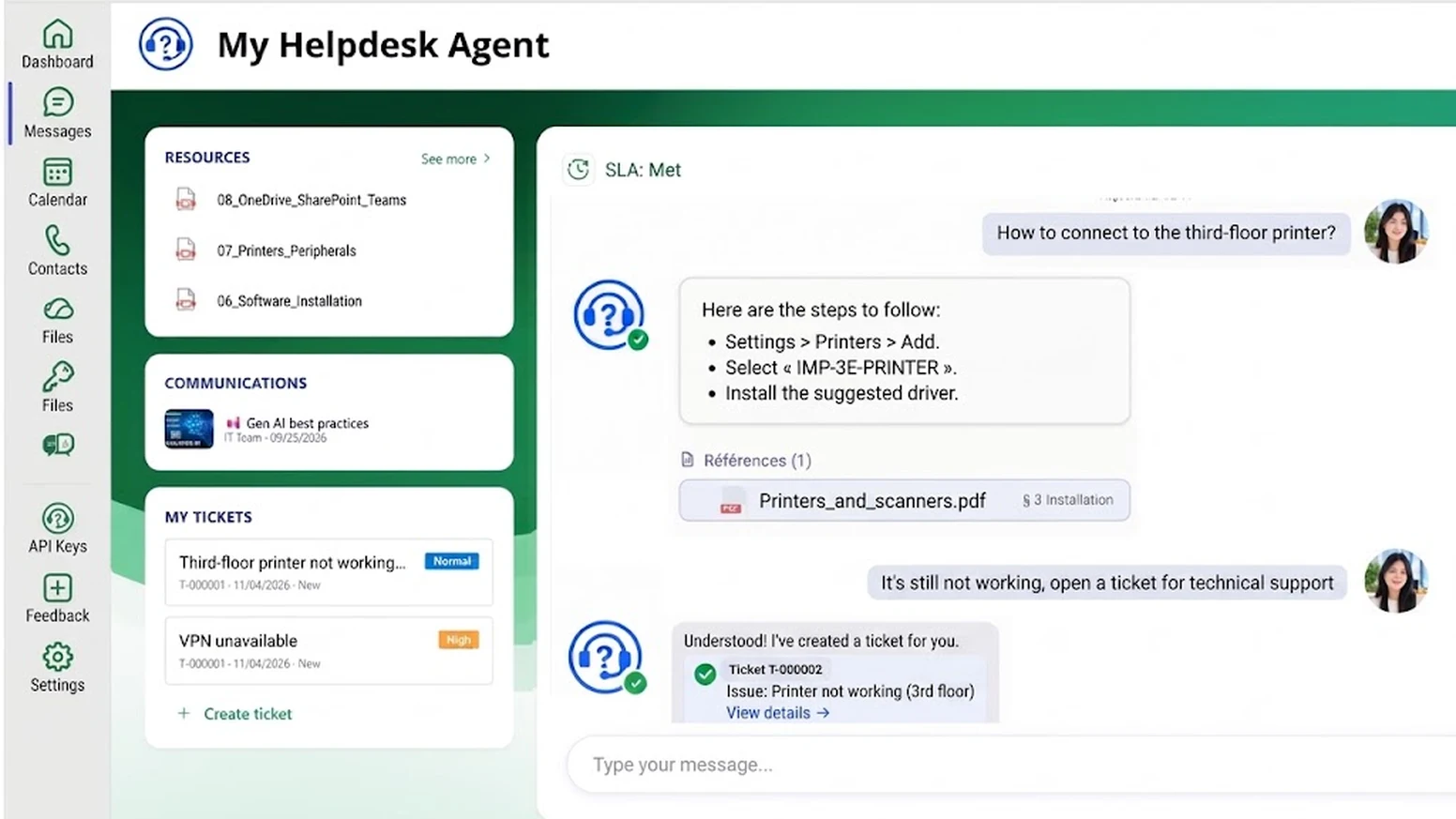
Internal help desk software is the tool that receives, handles and tracks the requests employees send to IT, HR or facilities: a locked password, access to an application, a question about time off. There are three kinds: ticketing, ITSM (IT Service Management) and AI agents. For a small or mid-sized business on Microsoft 365, an AI agent in Teams answers first-level questions and opens a ticket only when needed.
- Internal help desk software handles requests from employees, not customers: access, hardware, software, HR questions.
- For the support manager, it brings all requests into one place and only turns into tickets the requests that need an intervention.
- For employees, it gives an immediate answer, at any time, and lets them open a ticket in one click if the answer is not enough.
- AI Desk Pro combines the AI agent, built-in ticketing and a connection to your ITSM, with project support from Witivio.
Looking for internal help desk software, or help desk software for a small business on Microsoft 365? Most results focus on customer service. The need is different: answering employees who ask IT how to reset a password, or HR how to request time off. This guide presents the three kinds of tools, the selection criteria, and what an AI agent in Microsoft Teams changes.
What is internal help desk software?
A customer help desk handles requests from your customers, by email, chat or portal. An internal help desk handles requests from your employees: access, hardware, software, HR or administrative questions. Its users are already signed in to Microsoft 365, answers are often already written in SharePoint, and many requests come back every week.
For the IT or HR manager, a good internal help desk lets you:
- receive every request in one place, instead of by email, phone or in the corridor;
- handle as tickets only the requests that need an intervention, while simple questions are resolved upstream;
- track activity: request volume, most frequent topics, employee satisfaction;
- spot missing or outdated documents from the questions that went unanswered.
For employees, it lets them:
- get an immediate answer, 24/7, without waiting for a technician;
- ask in plain language, where they already work, for example in Teams;
- open a ticket if the answer is not enough, then follow its progress.
At a large public-sector organization that is a Witivio customer, the AI agent has handled more than 3,500 requests automatically.
Three kinds of internal help desk software
On mobile, swipe the table to the left to see every column.
| Kind | What it does | Strength | Limit |
|---|---|---|---|
| AI agent in Teams | Answers in plain language from your documents and opens a ticket when needed | Resolves repetitive questions without a ticket | On its own, does not manage complex incident tracking |
| Ticketing | Every request becomes a ticket, tracked to resolution | Traceability, SLA tracking | Employees open a ticket even for a simple question |
| ITSM | Ticketing plus incident, change and IT asset management | Full processes for a structured IT team | A heavy project for a small business |
These are not either-or: most companies need more than one of them. That is exactly the approach of AI Desk Pro.
Help desk software for small business: 6 criteria
- Where employees ask their questions. A help desk that answers in Teams is adopted far faster than yet another portal to open.
- The share of repetitive questions. The higher it is, the more an AI agent relieves the support team. At Witivio customers, first-level tickets drop by 20 to 40% within 60 days.
- Microsoft 365 integration. It avoids separate accounts: employees are recognized by their Microsoft account and the tool relies on documents already stored in SharePoint.
- Request tracking. A request without an immediate answer must become a tracked ticket. For contractual response times (SLAs) on complex incidents, check the connection to an ITSM.
- Data security. Check the hosting location, authentication, certifications and whether a data processing agreement (GDPR) is available.
- Total cost. Compare on your real number of users, including setup, the AI agent and support.
Internal help desk software compared (2026)
The main tools on the market, compared on what matters for an internal help desk. Public prices checked on vendor websites on 3 and 4 November 2026, excluding tax. US dollar prices are shown where the vendor publishes them; otherwise the European price in euros is given.
On mobile, swipe the table to the left to see every column.
| Tool | Type | Billing | Public entry price | In Teams | AI agent for employees |
|---|---|---|---|---|---|
| AI Desk Pro | AI agent, built-in ticketing and connection to your ITSM, with project support | Per user, all-inclusive | €11.50 per user per month (Starter, 10 to 50 users) | Yes, natively | Yes, included on all plans |
| GLPI (Teclib) | Open-source or cloud ITSM | Per support technician | Free self-hosted; cloud from €19 per technician per month | Ticket notifications (plugin) | No: the AI summarizes tickets for technicians |
| Freshservice | SaaS ITSM | Per support technician | $19 per technician per month (Starter, annual; €15 in Europe) | Yes, ServiceBot (all plans) | Freddy AI Agent, Enterprise plan on quote |
| Zendesk (employee service) | SaaS ticketing | Per support technician | €29 per technician per month (Suite Team, annual) | Yes, view and create tickets | Included, with 5 to 10 automated resolutions per technician per month, then billed per resolution |
| Jira Service Management | SaaS ITSM | Per support technician | Free up to 3 technicians; Standard from $21.50 per technician per month (monthly billing) | Yes, requests via Teams | Rovo AI agents from Standard; virtual service agent from Premium |
| ServiceNow ITSM | Enterprise ITSM | Per support technician | Not public, on quote | Depends on plan | Virtual Agent; Now Assist generative AI as an option |
Which help desk software to choose in 2026? To get started fast in Microsoft 365, an AI agent with built-in ticketing such as AI Desk Pro covers both recurring questions and requests that need an intervention. An ITSM such as ServiceNow, Jira Service Management, Freshservice or GLPI remains the right fit when the company must also manage SLAs, changes and IT assets. The two work together: the AI agent answers first and only hands the ITSM the requests that need it.
With AI Desk Pro, the per-user price includes the AI agent, unlimited messages and the solution’s features: no AI add-on to buy, no per-resolution billing, and a predictable budget from day one. AI Desk Pro can also sit in front of an existing ticketing or ITSM tool, to reduce its ticket volume without changing tools.
AI Desk Pro: a Microsoft Teams help desk with AI agent, ticketing and ITSM
AI Desk Pro does not force you to choose between the three kinds. It covers all three needs, and Witivio provides project support to fit it to your organization.
- The AI agent handles first-level requests. Your IT, HR and Finance teams build no-code agents that answer recurring questions 24/7, with answers sourced from your documents and SharePoint pages.
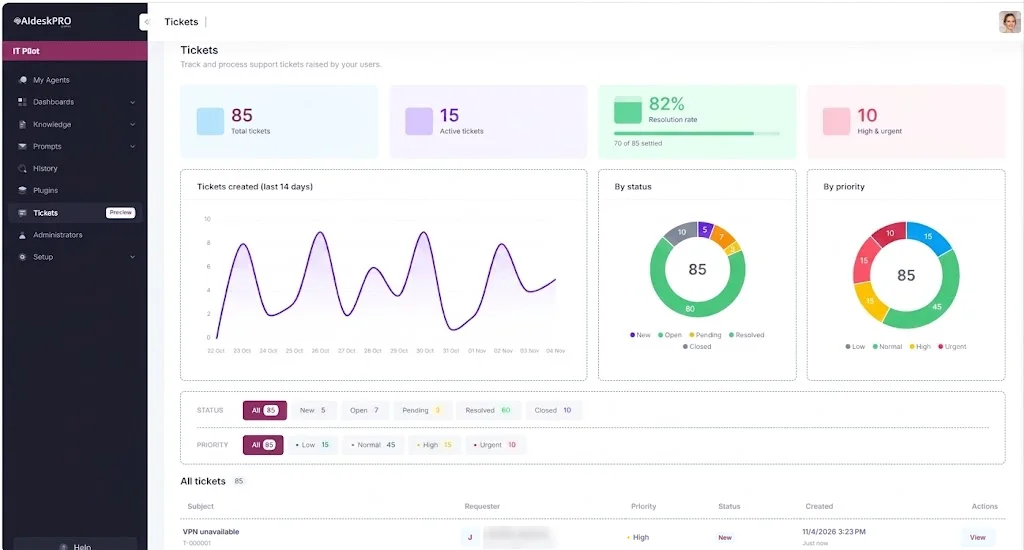
- Built-in ticketing takes over. When the answer is not enough, the employee creates a ticket from the conversation, exchanges with the support team, and the ticket is then closed. This module is currently in preview.
- Your ITSM connects when you have one. The agent creates and tracks tickets in ServiceNow or Jira, through a plugin connected to your tool’s API or through Power Platform. This connector is scoped with you and quoted separately.
- Witivio supports you, at your own pace. Your teams can start on their own: after an onboarding session with Witivio, they build the agents they need, without code. To go further, project support, usually 4 to 6 weeks, lets us understand your needs, build a first use case together and hand over everything your team needs to run the solution independently.
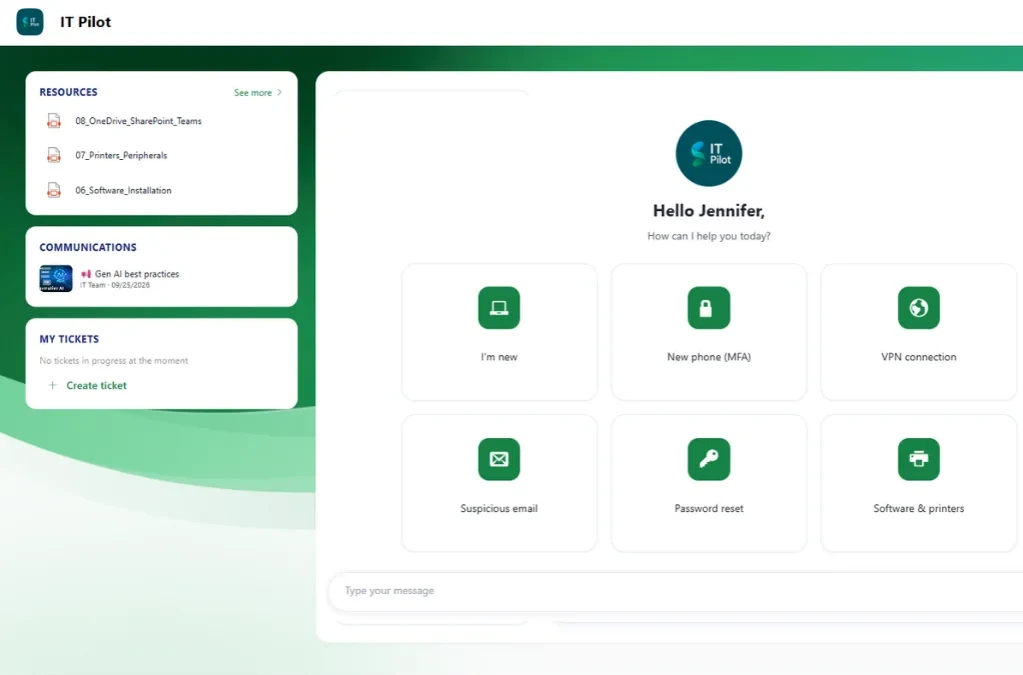
To see it in action, book an AI Desk Pro demo: we show the agent in Teams, on questions from your own teams.
On the support side, the flow is simple. The employee asks the agent a question in Teams. If the agent cannot resolve the request, it offers to open a ticket, without the employee leaving the conversation. The support team then finds every ticket in the AI Desk Pro console, sorts them by status and priority, and exchanges directly with the employee until the issue is resolved.
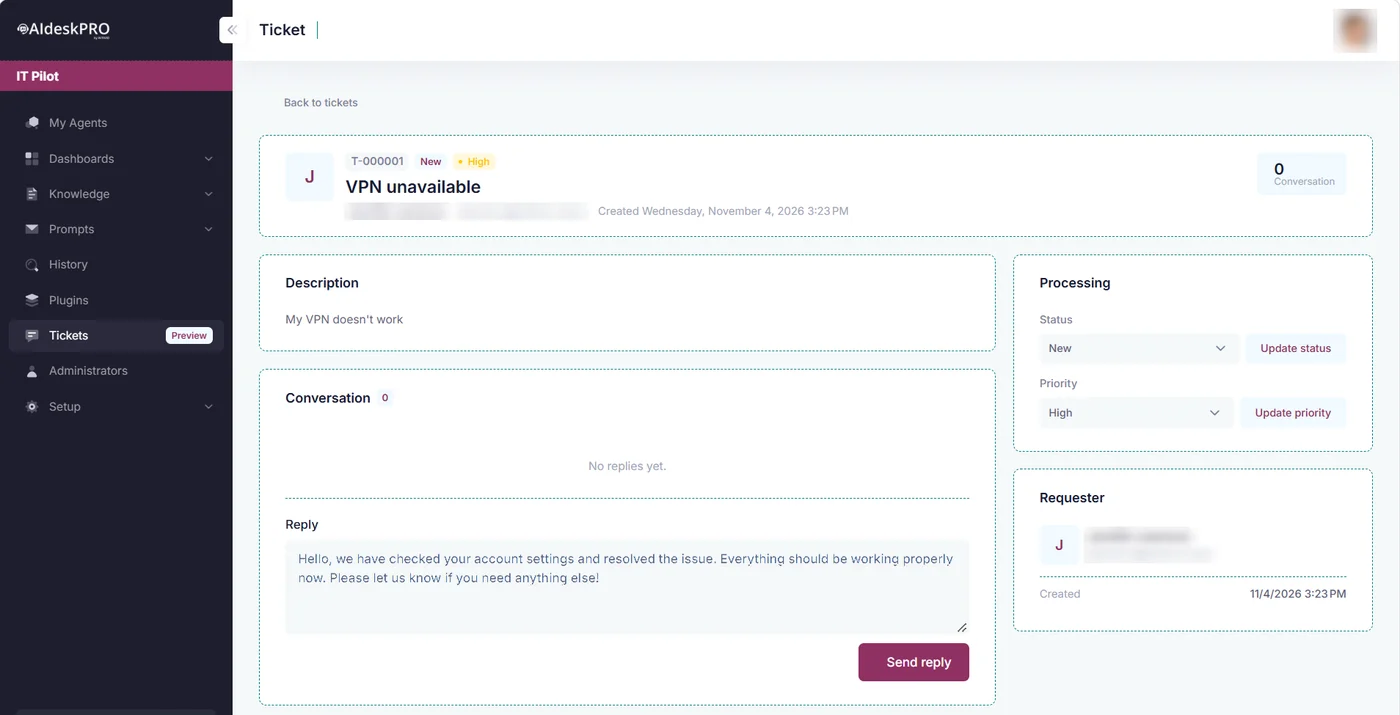
AI agent, ticketing and ITSM: one solution for your internal support
See AI Desk Pro in a demo, on questions from your own teams, and how Witivio supports you to put it in place.
Security and data hosting
An internal help desk processes personal and sometimes sensitive data. AI Desk Pro is built to pass a demanding security review:
- Hosting in Europe. The solution is hosted 100% on Microsoft Azure, in European regions (North Europe or France Central), exclusively on Microsoft managed services.
- Encryption. Data is encrypted in transit and at rest.
- Microsoft authentication. Employees and administrators sign in with Microsoft Entra ID: multi-factor authentication, conditional access and your organization’s policies apply with no extra setup.
- Controlled access to your documents. The agent only indexes the sources you authorize, such as designated SharePoint libraries, and this scope can be revoked at any time from Entra ID.
- Traceability. Your administrators can review the conversation history, with the sources cited; an anonymous mode hides employees’ identity when needed.
- Compliance. Witivio is ISO/IEC 27001:2022 certified, applies GDPR by design and provides a data processing agreement (DPA) with its list of subprocessors.
Details are on the AI Desk Pro security page.
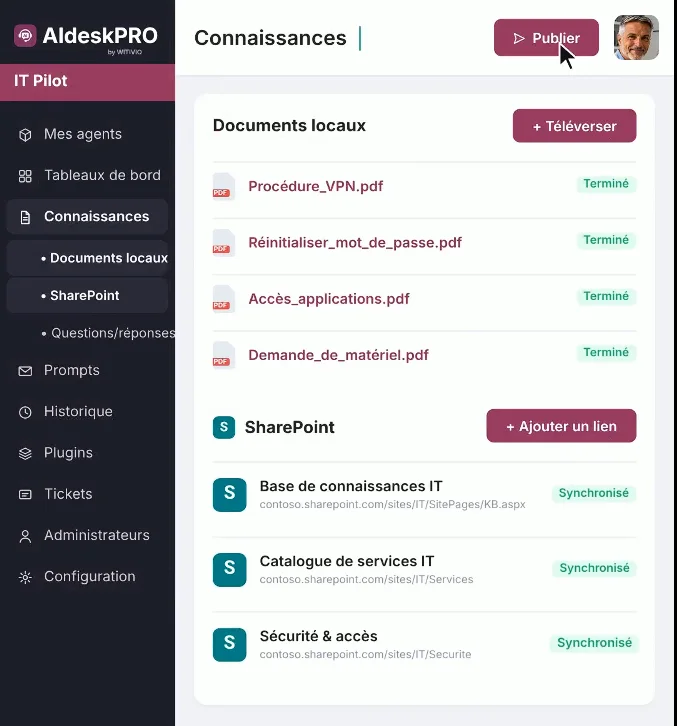
See the agent handle your IT and HR requests
An AI Desk Pro demo in Teams, with the questions your employees ask every week.
Internal help desk software pricing
Each ticketing or ITSM tool has its own pricing model: compare them for the same number of users, setup and AI agent included. AI Desk Pro is billed per user, with an annual commitment and unlimited messages (pricing page). Prices excluding VAT:
On mobile, swipe the table to the left to see every column.
| Plan | Price per user per month (10 to 50 users) | Note |
|---|---|---|
| Starter | €11.50 (€138 per year) | Local documents, up to 10 documents |
| Premium | €15 (€180 per year) | Most chosen plan |
| Platinium | Custom quote | Human escalation |
| 500+ users | From €5.50 | Usage-based, by volume |
Prices decrease from 51 users. To estimate the savings on your IT support, use our IT helpdesk ROI calculator.
Ticketing, ITSM or AI agent: our take
Whatever your starting point, AI Desk Pro fits your situation, with Witivio’s project support:
- No tool in place yet: AI Desk Pro brings both the AI agent for recurring questions and built-in ticketing for requests that need an intervention. One solution is enough to get started.
- ServiceNow or Jira already in place: keep your tool. AI Desk Pro sits in front, handles first-level requests and only creates useful tickets in your ITSM, through a connector set up during the project.
- Managing incidents, changes and a large asset base: your ITSM remains the reference tool for these processes. AI Desk Pro complements it by absorbing simple requests before they become tickets.
Try AI Desk Pro on your own internal requests
A demo on your real questions, then pricing based on your number of users.
Frequently asked questions about internal help desk software
A tool that receives, handles and tracks employee requests to IT, HR or facilities. It can be a ticketing tool, an ITSM platform or an AI agent that answers directly in Teams. AI Desk Pro combines the AI agent, built-in ticketing and a connection to your ITSM.
AI Desk Pro, an AI agent in Microsoft Teams with built-in ticketing and per-user pricing, along with GLPI, Freshservice, Zendesk, Jira Service Management and ServiceNow for ticketing and ITSM, billed per support technician.
The one employees will actually use. For a small business on Microsoft 365, an AI agent in Teams requires little setup and handles recurring questions. With AI Desk Pro, built-in ticketing takes over for requests that need an intervention.
An external help desk serves customers. An internal help desk serves employees, who are already signed in to your tools and ask about IT, HR or internal procedures.
For everyday requests, AI Desk Pro answers and creates tickets in its built-in ticketing. For full SLA, incident and change tracking, an ITSM remains the reference tool: AI Desk Pro connects to it, for example ServiceNow or Jira, through a connector set up during the project.
AI Desk Pro costs €11.50 per user per month on Starter and €15 on Premium, excluding VAT, for 10 to 50 users, with an annual commitment, unlimited messages and the AI agent included. Prices decrease from 51 users, down to €5.50 above 500 users.
Sources
- AI Desk Pro, Witivio
- AI Desk Pro pricing, Witivio
- AI Desk Pro security, Witivio
- AI agents for IT, Witivio
- GLPI Network pricing, Teclib
- Freshservice pricing, Freshworks
- Zendesk employee service pricing
- Jira Service Management pricing, Atlassian
- ServiceNow ITSM